I’m using pop_os and I desperately want scaling to work and it doesn’t.
I’ve found this works well across high and low DPI machines.
It's an adjustment going back to a 1080p screen for a bit.
A bit frustrating that there is no way to report that you might be seeing this message in error.
EDIT: Especially frustrating as I'm actively looking for a good Linux laptop to replace my MacBook - specifically I'm worried about compatibility with my thunderbolt docks
Is this basically a System76[2]-like effort?
[EDIT] - I own an System76 Oryx Pro and love it -- this laptop being a rebranded effort is not a bad thing in my mind, if anything it gives me more faith in the initial build quality. If the KDE org gets it just as right as System76 (open source drivers galore, fantastic system tooling and support), then this is going to be a boon for open source everywhere, more money in KDE's pockets, more linux-first machines out there.
[0]: https://www.walmart.com/ip/MOTILE-14-Performance-Laptop-FHD-...
[1]: https://the-gadgeteer.com/wp-content/uploads/2019/12/Motile-...
e.g. 4xxxH like this laptop
Most laptopts I see use the 15W versions, very rare to find anything competitive with Macbook.
    This website is using a security service to protect
itself from online attacks.I'm using a type c plug to run my monitor, USB hub and charge my amd laptop right now
Asus g14
The whole USB-C/Thunderbolt split still confuses me so apologies if I'm making terminology mistakes :)
I would really like AMD to release CPUs which can compete with intel's core M3, which can be used in SBCs or pocketable netbooks like these[1][2]. I feel there is a need gap in this space for a reputed manufacturer or a trusted enthusiast brand to get in.
Why would you want a pocketable Linux pc? one may ask; I'm tired of this always tracking smartphone cellular-apps cluster-X mess. My phone-call usage lifestyle is anyways on-demand(little to no incoming calls), so why not just use a USB GSM module on a pocket Linux pc when needed.
P.S. I'm aware of upcoming pure Linux smartphones, some with cellular-kill switch, I'm a vocal support of these platforms, but it's not available in my country and as I understand they are not ready for a daily driver.
You could probably run Linux on one of the GPD Win devices. (e.g. https://www.reddit.com/r/gpdwin/comments/glpokv/gpd_win_max_...)
Also, as an aside: rather than using a GSM module with a real SIM card that you'd have to pay monthly for, you could just subscribe to a VoIP service (I use https://voip.ms) and then connect to it with a softphone app to place and receive calls.
I pay $1/mo for a number, and $0.005/min for calling, and that's it. I have softphone apps for my PC, phone, and tablets, that are all connected to its same number, so I can answer calls "directly" through any of them, without one device having to route through another. (Also, as a side-benefit, I've set it up with has voicemail-to-MP3s-in-my-email, like Google Voice does. And configured it so that if people outside my whitelist call, they go directly to voicemail.)
Works especially well when combined with a phone that you set up as a "tablet" with a data-only plan. (This plan costs me $10/mo, in Canada, which is quite a feat if you know the Canadian cellular ISP market.)
Oh, and I've also written a SMS<->Slack bridge bot (https://github.com/tsutsu/smsforwarder), that I run as a Heroku free-tier app wired with webhooks to voip.ms's SMS API. SMSes to my VoIP number pop up in a Slack channel named after the peer's number in a special private Slack team I created; and messages I write into that channel are sent back to the peer number as SMSes. So all the same devices that have the softphone app, have Slack, and so can also interact with my SMSes in a shared manner as well.
But I've been amazed at how many programmers don't like to have them. Why?
Then create a windows VM in linux with direct disk access.
The rest are mostly gaming models. The Asus G14, TongFang's GK5/GK7 (like the Eluktronics RP-15/17), HP Omen 15, and the Lenovo Legion 5 are the best of the bunch. They all have Nvidia 1660Tis/2060s.
The 4800H performs on par with the 10875H at lower temps/power usage but I think competition w/ a Macbook is going to be subjective. None have anywhere close to the fit and finish of a MBP. Most are significantly cheaper. Most will have a better port selection and better upgradability (although some also have soldered RAM). Most will have better battery life. Only a few will be more portable. Only a few support USB-C PD. Only a few have >FHD screens and if you need >100% sRGB color gamut, there's literally only one AMD option (the 4K Schenker VIA 15 Pro), and that won't be available until September at the earliest. There are plenty of 10875H+ laptop options on the Intel side. Some like the new XPS's are specifically designed to compete head-to-head w/ MBPs.
I had mentioned it in my parent comment. I cannot get these devices inside my country for the same reason I cannot get a PinePhone due to China-India tensions; even before the blockade I have heard horror stories from people who imported computers from Aliexpress in India having to pay 2-3x the price as import taxes!
Furthermore, I would like a brand which is available to greater Linux audience in western countries, so that it's been vetted properly.
>Also, as an aside: rather than using a GSM module with a real SIM card that you'd have to pay monthly for, you could just subscribe to a VoIP service
I do use VoIP services, but without a GSM module how do you connect to the Internet(4G/LTE) on the move in a PC? i.e. considering you are not carrying a smartphone. Places where WiFi hotspots are available are not an issue(If you don't consider them to be a security risk or being stationery), but say you have to book a Uber on the move then a GSM Module for Internet + Anbox for Uber app seems necessary.
smsforwarder looks cool, I will check it out. Thank you.
That pretty much sums up the care and thoughtfulness of the Linux desktop ecosystem.
It sadly seems impossible to eliminate all the maliciousness without also impacting legitimate users, but it's obviously a low enough number that the various little uproars never really gain momentum.
But thinking about how technical users severely impacted by the situation gives me an idea: a Chrome/FF extension could trivially the various CF block/captcha page HTML, and fire off a ping to a server somewhere with some statistics about ISP, (very) coarse location (eg, capital city resolution), time of day, optionally the website in question... hmm, and maybe the server could have an account/distinction system, so it could let users who cannot access XYZ website they don't want to disclose, how many other users in their area are also unable to access the site...
Hmm. Thinking this through was useful. There are a lot of tricky privacy balances this would need to upset in order to be most practical. And then on top of that the malicious users would probably figure out a way to ruin such a service :/
Wait. Maybe use an invite system with a user tree?
</thinking_out_loud>
I can't find anything historical that used 3.2kHz memory access speeds, but I'm pretty sure there was something out there... from the 1960s.
I usually prefer 2x scaling on a 4k screen, and then pictures and text are unscaled. I like being able to put a 1080p movie in the upper left corner and a reference webpage below that, then a big text editor to the right and 'work'.
[^1]: Completely off topic, but I love when there are words that capture a feeling in one language for which there isn't a suitable analogue in another. For non-Thai speakers, this word means burdensome, but depending on context covers the whole span of "inconvenient" to "distressing". In general, though, I find English has more individual words that express an entire concept vs. Thai which has to use compound words to explain its meaning.
In Polish we have 9 such characters and most people use just so called "programmers keyboard layout" which uses left-alt + letter to do the accent.
E.g. alt + e = ę, alt + l = ł (with a one case where we have two different accents for a single letter: z, so we use alt+z = ż and alt+x = ź, the second letter is less commonly used then the first one)
20-30 years ago there were some strange keyboard layouts that didn't use alt, but hopefully they were forgotten.
Even on normal keyboards I don't use it, and they are annoying because they make the mouse position awkwardly more to the right than it should be healthy for the arm (I really envy left handed people, they don't have to deal with this).
And it is next to impossible to get a keyboard without the numpad, fortunately I found two such keyboards and I have one at work and one at home (Logitech K310 and Microsoft Sculpt).
And I haven't seen in live any person that uses numpad, I always thought it is used by accountants only (and those that don't want to use two hands to enter numbers).
Some people move to BÉPO or something like that, I use QWERTY with Xcompose.
on the right of the keyboard: ù
but that's enough to want accents and symbols on the number row by default (&é"'(-è_çà) and numbers when pressing shift.
I think that's the reason that bépo (a French variant of dvorak which allows easy access of both common accentuated keys and numbers) is more popular among French speakers than dvorak is for English speakers, proportionally.
Any 4K monitor 26" or greater is the same dpi as FHD at 13"
Various examples here https://www.newegg.com/p/pl?d=4k+monitor
A 24" 4K monitor is only 8% better in fact. I would venture to guess it would be basically indistinguishable to the naked eye.
QHD at 13" is 226 ppi is that really a reasonable minimum?
That said, I see a resurgence of smartphones with physical keyboards and once people get used to them, they may seek better screen/keyboard/performance with a pocketable laptop but the GSM integration is a major limiter for many. It's not like people are going to throw away their smartphones for a portable computer anytime soon.
Gnome programs work perfectly. Qt looks good when wayland backend is force enabled but it causes crashes in certain situations so it's choice between slightly blurry text and occasional crash. Firefox works well, it used to require an environment variable not sure if it still does. Chrome support still not there, scale is correct but text is blurry.
The only main problem with QHD is that once you've got used to it, it is really hard to go back to anything less.
Make one HDMI 2.0 and the other Displayport over Type-C and I'm fine.
I'd love to see a USB 3 Type-A Port aswell but that seems like too much to ask nowadays.
I use a 13" MBP with no UI magnification, but most web pages scaled to around 200%. That keeps the UI nice and compact and leaves a lot of screen space for actual content (about 2170x1523 with my current browser layout). I do occasionally set it to a scaled resolution when someone else has to watch/use the machine as well.
>without a GSM module how do you connect to the Internet(4G/LTE)
This is also a reason why we need non-cellular mobile Internet[1], like city wide WiFi hotspots.
[1]https://needgap.com/problems/51-non-cellular-network-mobile-...
> Taking one music class or art class can teach you a lot, but it won't make you a maestro. Maestro (which comes from Italian) is reserved for people with an enormous amount of skill and talent. This word can apply to any type of artist — and sometimes, to people with impressive skills in other areas — but it's most commonly applied to musicians. Master composers, pianists, cellists, guitarists, and conductors are often called maestros.
BTW don't get me started on Ctrl/Fn confusion. Every other laptop I have switches these keys around.
WSL is for the folks that buy macOS instead of giving money to Linux OEMs, and now are looking elsewhere but still not for Linux OEMs.
Aside from making it much faster to enter numbers, I also really like it for gaming - instead of using WASD, I use the numpad 4,8,6,2). This means a whole bunch of other keys are right there for use by the same hand, e.g. 7/9 for jump, "/" for throw, 1 for crouch, 3 for prone etc. I realise this is controversial tho!
Anyway, I still do use the separate numpad every time I need to input numeric PINs or monetary values.
Which is a real shame, I'm quite determined to have a single cable AMD model for my next laptop. Currently the best lineups for that seem to be Lenovo ThinkPads and Yogas.
- It's own tactile identifier
- Easy access to numeric operators
- plus without shift
- Diminished use of the pinky finger
- The only actual 'enter' key on the keyboard
I admit that it's subjective. 'Tenkeyless' is a standard mechanical keyboard trope for a reason.
Not a problem on desktops since they don't have optimus but on laptops without a proper optimus implementation for linux you'll end up with your 1660TI or whatever running at full blast with just your terminal opened, killing your battery in no-time and turning your laptop into a frying pan.
That's why linux devs prefer no nvidia dGPUs on their laptops.
Search for "keyboard TKL", easy peasy.
The main points I look at a laptop by are keyboard, trackpoint, then display quality, then the rest. I couldn't care less about the Ryzen part; the keyboard looks abysmal.
(That has nothing to do with the detailed, and very nice content.)
Do you have recommandation of linux compatible laptop with good keyboard and touchpad ?
What can you actually do faster on the numpad if the starting position is your right index finger resting on J?
Because that's where it should always be.
It's also terrible if you're French.
I also got a pinebook pro and I managed to use it a sum total of 12 times (and only on flat surfaces with the power plugged in because otherwise the screen would flicker like a strobe light) before the screen completely gave up and now it's an expensive paperweight.
Still I will keep buying these things.. eventually someone will figure out how to make reliable laptops that align with the ethos of free software. I've researched system76, puri.sm and also lately the way too expensive MNT reform, but really the only laptop people seem to be happy with is thinkpad x220 / x230 which came out 12 years ago.... This makes me sad.
I would pay a lot for a super sturdy laptop which works (and aligns with the free software ethos).
It’s just awful. An accessibility disaster, and I don’t say such things lightly (normally I might just say it has serious problems).
If I come across much more usage of Notion, I’ll need to craft a user script to unbreak as much as I can. document.querySelectorAll('[contenteditable]').forEach(e => e.contentEditable = false) is a good start, fixing the focus issues. Unfortunately all their event handlers are on the root element, so you can’t just clobber them with document.body.outerHTML = document.body.outerHTML or similar but must figure out some other way of deregistering or breaking their event handlers.
Using that laptop in Linux was the bane of my life, Optimus is hell and if you want to switch between Intel/AMD you need to reboot, no thanks.
You can't use it for VR if you have the type of Optimus I had, where if the display was connected to the Intel rather than to the Nvidia, it wouldn't work. If you left Nvidia on, and tried to use it as a laptop, you'd be lucky to get 20 minutes battery life (not exaggerating), so it was neither great for gaming nor useful for productivity.
> And it is next to impossible to get a keyboard without the numpad
Every single keyboard in my home, would like to disagree with you. I have at least a dozen, not one with a numpad.
A lot of them are mechanical, Tenkeyless (TKL) which is my favourite size, and is _literally_ a numpadless form factor.
You might say, that they don't count because they're mechanical, or expensive, or loud, or some other argument, non of which are unavoidable, but, if you want to argue concern about comfort of keyboards and long term use, I think you should seriously consider investing in a half decent mechanical. There are ergonomic form factors, and variety of sizes and key counts from 40% to over 100% (of standard).
You can get a cheap TKL for as little as £30, or hand build one like some of mine for £500-700+ and everything in between.
Also, numerical operations / form filling while consuming liquid or holding a pet. It's surprising the number of times the ability to perform even a subset of tasks while not having both hands to dedicate has allowed me to maintain focus and interest instead of stopping dead and having to spool back up slowly.
> Because that's where it should always be.
I must admit, I have yet to figure out how to maintain this discipline while whiteboarding, let alone walking, or sleeping.
One of the possible root causes for those symptoms might be dried up (or wrongly applied) cooling paste between the heatsinks and the CPU/GPU.
I highly recommend trying to replace the cooling paste, this may fix all your issues.
I recently did this on my 2 year old Asus laptop and it feels like I just bought a new machine. It went from unusable to I won't have to buy a new laptop for a couple more years. It cost me 10 EUR and maybe half an hour to get it done.
I've learned from Thai speakers that there are multiple words that mean multiple things depending on the context. Where as English (and Dutch) do have this sometimes, but less often than Thai words. I am pretty sure (but correct me if I'm wrong) that both Chinese, Japanese and Korean have this too.
Dutch also has some interesting words that cannot be directly translated to English. In Dutch we don't have 'siblings', we have 'broers en zussen' where 'broers' are your brothers and 'sisters' are your sisters. There is no word that we use for both of them. Same with the word 'gezin', it means the family you are living with.
Another one is 'giftig' which has 2 english words too. Poisonous and venomous, but in Dutch it is the same thing.
I have never seen anyone use an Alt+number to get these, I personally default to EN layout and switch only when I write in local language.
Edit: people who say numbers without shift: do you realize you can switch the keyboard layout using Alt+Shift ?
In short research, I found they are hundreds of them available on Amazon, Aliexpress. However, most of them have mechanical switches[0][1], some of them have conducted switches (like Topre[2]) and it is very rarely to see cheap, typical office-use TKL keyboards made by companies like Microsoft or Logitech but Matias have at least sell one model [3].
It might be handy to read a short guide [4] of keyboard naming by their sizes, whether you will look for new keyboard in future.
[0]: https://www.amazon.com/10-keyless-keyboard/s?k=10+keyless+ke...
[1]: https://www.keyboardco.com/category.asp?path=Mechanical%20Ke...
[2]: https://www.amazon.com/s?k=topre&ref=nb_sb_noss_1
[3]: https://www.keyboardco.com/category.asp?path=Mac/Standard/Te...
[4]: https://www.keyboardco.com/blog/index.php/2017/08/full-size-...
> This is due to the well known engineering limitation that links LCD size to the density of RAM modules that can be supported by a motherboard.
https://news.ycombinator.com/item?id=21445497
I thought this comment 8 months back was correct. I dont know the limitation nor could find something related.
I'd pay money to see Louis Rossmann try though.
I'd just like a Ryzen 4800U version of my current machine, even if it means sacrificing Thunderbolt 3.
I think i'll have to wait for 5800U to come around and have USB4 though to see that happen. :(
You won't ever have an issue with dry paste, and from what I can tell the CPU/GPU only runs a degree or so hotter than when using premium thermal paste.
We've retained x y q (no purpose in our alphabet), making it quite convenient to just type using the native keyboard layout, regardless if I'm writing in my native language or in English.
All typing machines used it, but it was awful for programming obviously, so the "Polish programmer's layout" was added, and because it was exactly the same as standard american QWERTY (except for Left Alt + some letters) it won almost overnight.
Windows still shipped with both layouts enabled for Polish locale for decades, and nobody used the typis one, but there was a shortcut that changed between them.
When you accidentally used that shortcut - if you had Y or Z or Polish letters in your password - you couldn't log in (because you typed "yeti" but got "zeti" but it still looked like * * * * :) )
I think there must have been millions of USD lost on support calls because of that little shortcut :)
I've run Fedora and a custom Debian setup in the past (and currently am using Void Linux). Things mostly work with no real issues.
I think perhaps the mistake is paying premium with new and shiny things that haven't stood the test of time is the problem here? If you buy cheap (something that is a known quantity also), you're less likely to feel the b urn of walking away from the shiny / expensive new thing, right?
Note: I also have the X230 (bought off craigslist for ~$100, 2 years ago) and have given that to my dad who has used it happily for years now.
Even then, plenty french programmers use a qwerty layout of some sort. I saw people using the Canadian layout, and the international layout is I think the most efficient for IT stuff, even if it requires getting used to composing accentuated characters.
I have a x220 i7 + SSD + 16GB ram and am mostly happy with it. But for the follow up, a better CPU would be nice (rust compiler mostly), and a bigger screen. I fear the compromise on the track pointer will be unavoidable.
Anybody has some inspiration?
Was it something like a braveheart edition? Did you get in touch with them? I presume the display is easily replaceable. Community members over reddit say, Pinebook is now reliable and they have ironed out several issues but obviously it wouldn't be as powerful as other laptops being discussed here.
Every now and then the fans wind up but that is usually down to browser tab going rogue.
Sadly I'm in Australia and the postal systems are crazy right now.
It was lighter and more powerful than the Macbook Air I've been using the last few years.
(In the end there were times when I wanted an actual laptop with me, i.e. non-work trips away)
If you're looking for something more phonetic possible as a stepping stone, Lao, despite having less content to consume, is much, much easier to learn where the abugidas look about the same if you squint; you could look at Lao as simplified Thai (with a 6th tone). Lao had a spelling reform recently that dropped all the duplicate letters for Pali/Sanskrit words, there's no implied vowel (and they change form less), there's no การันต์ (◌์), and the final consonants are normalized to the sound it makes. Lao and Thai are asymmetrically intelligible where Lao people understand Thai but not the other way around. That said, the Northeastern Thai dialect, อีสาน, is almost identical with small dialectal differences. Grammatically they are the same so anything you learn in one will almost certainly transfer to the other with just a different vocabulary set for common words (to do, to work, I, you, man, woman, etc.).
Stock paste goes for longevity and cooling, so it's kinda crummy at both.
Thermal pads go for longevity with a sacrifice to cooling.
High performance paste like arctic silver goes for cooling over longevity; but can be re-applied many times as it doesn't damage hardware.
Liquid metal like Thermal Grizzly's: conductonaught, goes for extreme cooling at the expense of hardware. (IE; it will literally eat your computer, slowly, over time).
I'm waiting for an announcement about the Raspberry Pi CM4, if they offer a model with 8GB of RAM, I'm very tempted to look into designing a carrier board that can replace my ThinkPad's motherboard. It will need an active DSI to LVDS converter to drive the display, and a small microcontroller to act as an embedded controller to read keyboard scancodes, trackpoint input and talk to the battery.
Power usage is dramatically lower than the equivalent Intel chip, to the degree the latter exists. In addition to the CPU just being much faster overall, these also come with a Vega iGPU with half a gigabyte of dedicated memory.
It won't play Half-Life 4, but I've always noticed Intel chips being laggy and hot if hooked up to a screen with any sort of resolution, or if trying to run e.g. Factorio. Neither of those are a problem here.
Good luck and สู้ๆ นะ!
It also has an Nvidia for those times when you really need horsepower, but so far I've only needed it for ML.
>> Semi- >> Autonomous >> Remote >> Cache >> Assignment >> Synchronization >> Monitoring
Unfortunately looks like you got trolled. There's definitely no such engineering limitation. It's primarily, I think, a marketing limitation; if you want a beefier machine, they want to push you towards overall higher end equipment.
I've been looking at Ryzen 4000 based laptops. I need a pointer stick / eraser stick (I hate touchpads), and Lenovo is the only choice I've seen with Ryzen 4000 and a pointer stick.
The Lenovo T14 is pretty compelling. However, I just can't stomach paying roughly 4x the market rate for NVME storage. They want $719 for a 1TB NVME drive (where I don't even know the vendor), when I can buy a 2TB drive from a vendor I trust for 1/2 of that. If I knew I could just open the thing up and replace the NVME drive, then I'd get it. But I"m afraid they've BIOS locked it to whatever OEM drive they ship.
afaik the last dell with a track point thingy (https://xkcd.com/243/).
gen 6 i7, 32gig ram, 1tb ssd, 14" fhd. dated but capable
fan is mostly idle with linux desktop work but constantly whirling under w10.
should be affordable in used condition...
https://www.notebookcheck.com/fileadmin/Notebooks/News/_nc3/...
I'm not an expert in Cloudflare products but if I'm not mistaken, there should be a setting labelled something like "Onion Services" in your configuration console that makes the experience for Tor users a lot less painful.
à â ç é è ê î ï ô ö ù
If I remember correctly shortcuts to change layout/language are by default Ctrl+Shift and Alt+Shift respectively (correct me if I'm wrong). These are incredibly annoying, especially in some games. Luckily though you can disable them from the settings. Instead there's Win+Space, which is a Godsend and should've always been the only default.
Fun fact: on Windows Polish programmer's keyboard you can use the Tilde key (Shift+Grave) to input Polish characters as well, e.g. press Shift+Grave (it won't put in any symbol at this point), release and then press 's' to input 'ś'. However it makes it problematic to input the tilde symbol itself, so I've modified my layout with the MS Keyboard Layout Creator to get rid of that functionality/flaw (aside from other minor improvements) https://www.microsoft.com/download/details.aspx?id=22339
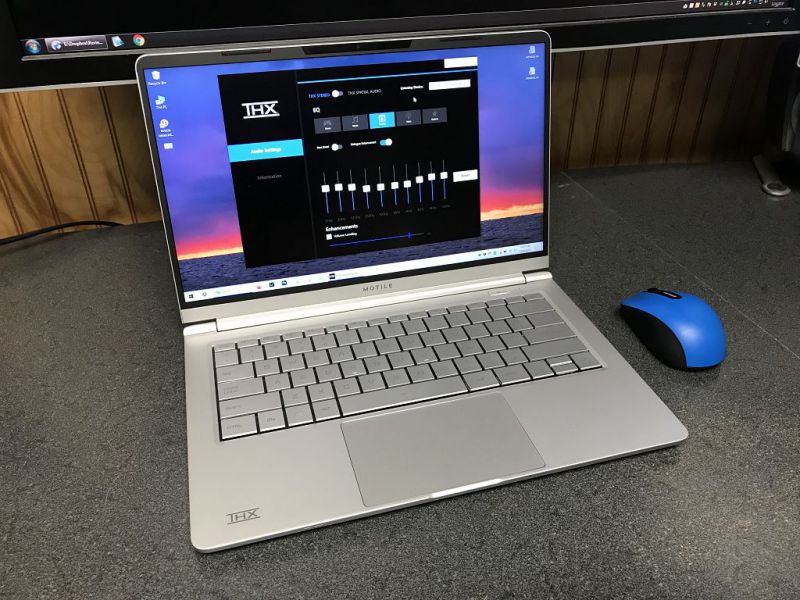
Also, not sure the MOTILE is even available with Ryzen 4 (only Ryzen 3 or Ryzen 5).
Possibly uses a similar chassis, but not even sure about that. Possibly same manufacturer.
And if you rightfully say "but 9 years is bad enough".. yes, but my x230 is only a little slower than my T460p and if I ignore the mobile Ryzens I don't see how a 2020 Lenovo T would be meaningfully better/faster than my 4 year old T460p.
Why would you be looking up and down?
You can get an Envy with a Ryzen 4700U (the 8-core 15W CPU), 16 GB of RAM, and a 512 GB PCIE NVM SSD -- for less than $900.
I only use keyboards that have low-key travel and are silent - basically anything that resembles laptop keyboard.
EDIT: Sorry for sounding a bit harsh, but keyboard-without-numpad != mechanical keyboard, which are quite niche, I wasn't aware that a niche product has a also niche variation - lack of numpad :)
For me mechanical switches are a no-go :(
The shortcut to change was definitely something with Ctrl and Shift because I remember accidently switching layout when I was selecting text by whole words with Ctrl+Shift+Left/Right.
Tilde works funny on linux - it makes alternative version of every letter, not only from the current locale. I was accused of being a Russian pretending to be Polish on some Polish forum long ago because I wrote something with a Greek (or cyrylic?) letter by accident because I did something with home directory in the background and only pressed ~ once instead of twice :)
But it wasn't obvious when I was looking for one, i used "no numpad" or similar, and to complicate it I searched for one in Poland.
It is a bit harder to find non-mechanical (I love low key travel and silence) one and one that is wireless, which I prefer but I see there are ones :)
I couldn't agree more, I was given 16:10 monitors for my current job and I'm not sure if I'll ever go back to 16:9 if I can avoid it. Next laptop is a 13" MBP for sure too.
Disclaimer: I am a heavily biased Pinebook Pro user :)
FWIW, my goal is to run FreeBSD-current on it.
https://pointieststick.com/2020/07/23/the-superfast-ryzen-po...
DDR4 SODIMM 32GB modules are about $150 right now so you can pop one in if you want and if your machine supports it.
What line of work are you in? A cross between hardware and software?
If one is in pure software it seems extremely error-prone to be typing in numbers all the time manually.
According to a Linus techtips video on Youtube the difference is not really measurable. So I kind of tend to think that a high quality thermal pad is just simply superior in every way. The only reason I didn't try it, is because I couldn't find any in stock.
click Customize, then choose Ryzen 7, then choose 32GB memory.
https://youtu.be/YpphKzmDiJM?t=420
FWIW Steve Burke did an even more detailed burn down of these pads:
https://www.youtube.com/watch?v=niAQs8dZohE
(LTT was later able to get -20C cooling with Liquid Metal: https://www.youtube.com/watch?v=hdTsra-uLBI )
- Touchpad sucks
- Battery lasts 2 hours
- Sleep mode doesn’t work
I would pay for a motherboard replacement with an AMD mobile Ryzen CPU (renoir), like nb51 did with the X62
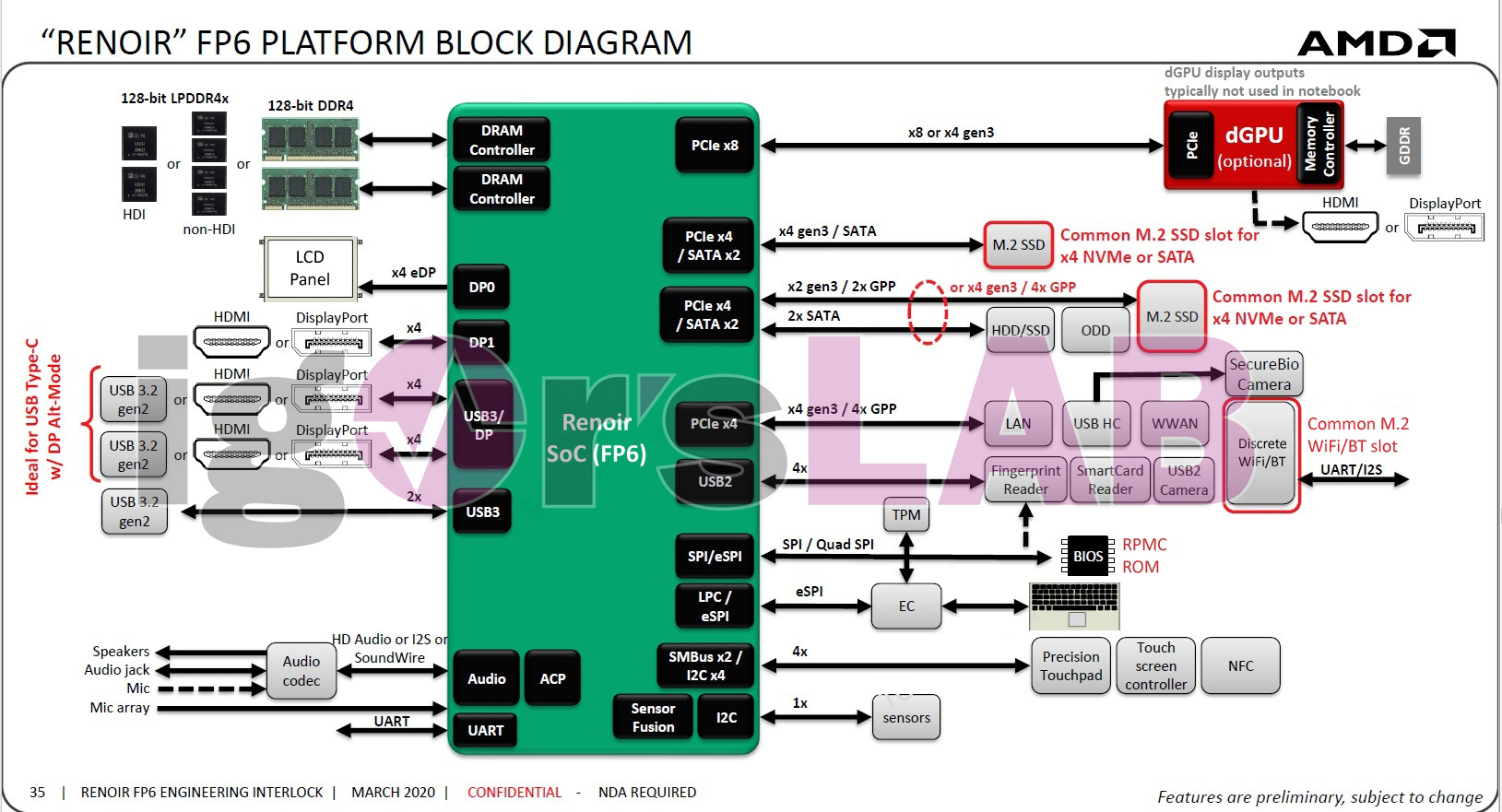
It's using the exact same chassis, but as you mentioned this generation is a significant internal improvement - not just dual-channel RAM, but also significantly upgraded TDP (54W vs 22W) with new dual-fan, dual-heat pipe cooling, plus USB-C PD.
The 15" refresh the PF5NU1G was also launched at the same time initially as the Mechrevo Code 01. I've posted earlier in this thread linking to all the details about it for those that are interested, since I have one.
Numbers on the top of qwerty are good for incidental numbers when entering text, but around 5 consecutive digits is enough for me to move.
Are they useful enough to add to a laptop keyboard? Probably not.
I've also been really happy with my Razer Blade which I've used alongside a Macbook Pro for the last ~3 years.
The Envy 13 is also limited to 16GB of soldered RAM while the Slimbook can be upgraded to 64GB. The 15" version has a huge battery advantage over the Envys.
It's also worth noting that the pricing listed includes a 21% VAT. The pricing is more competitive once you take that into account.
If your mouse is right-hand specific, try getting a ambidextrous one next time. Most of the ambidextrous mice these days are gaming mice, but they work fine for pushing cursors around too.
I just find it simpler to have 1 high resolution screen where I can put high def content side-by-side or in quarters on screen.
For now this works, but in 10 years when movies and web pages are 4k by default I'll need an 8k laptop screen (haha)
(Probably at 17" though)
I have long been impressed at the small laptop form factors available in those countries. There are many fewer options for wide sale in the US for example. It would seem to me like further west there is less demand for something small.
Laptop manufactures who don't offer keyboards without numpads, to me, care so little about their customers that their laptops aren't worth shit. I'm looking specifically are all laptops > 14" from system 76. If they want to be taken seriously as a manufacturer, they should consider a line of 15" or 16" laptops that aren't going to leave people in pain, considering changing careers. Of course, I only use the internal keyboard when absolutely necessary and can't use an external with an external display, and it still makes that big of a difference.
Ergonomics matter.
You can also run an additional m.2 ssd in the WWAN slot which works just fine assuming you grab the correct type. It's not the standard m.2 though. It's weird and has 2 notches instead of 1. My understanding is when it comes to this slot only specific drives will work properly. I grabbed an SN520 512gb (2242 size by the way, the standard 2282 is too big and 2232 is too small) off of ebay and I'm booting from it as we speak. https://www.westerndigital.com/products/internal-drives/pc-s...
So when it comes to the standard m.2 slot my understanding is that there are no limitations, but the using the WWAN slot as an ssd slot can lead to issues unless you get the correct one.
Unfortunately I don't have any insight about running freebsd on this machine, so good luck to you there.
I have one laptop with an OLED panel that's (IIRC) 105% Adobe-RGB, and it's sufficiently nice that I'd like that everywhere if I could, but it isn't enough to rule out the G14 for me. Perhaps it's a good thing that I'm not into photo editing, as a rule.
I think in most cases it's pretty easy to pry these things apart and swap the batteries out.
A friend of mine runs an IT help desk team that manages a fleet of T series laptops and they have a lot of problems. You got a good one. It’s so unfortunate that these have a lot of problems, they are almost perfect.
When I am working I only use one screen, and only one window in the screen, and instead I constantly switch between virtual desktops, to the point where I just think "browser", "editor", "terminal" without even perceiving the keystrokes.
However, for gaming I dream of having one of these ultrawide screens that have the resolution of 3 normal screens side by side. Something quite complicated to have in a laptop, but I have seen some attempts.
The strength of the mechanical market, the reason why it's getting bigger, is not that it's mechanical and "clicky"(that's the stereotype), but that it's customizable. All of it. Case, PCB, keyswitches, keycaps, stabilizers. If you don't like the switches stock, they can be relubricated and modded with rubber O-rings. If you want a dampened response the stabilizers and keycaps can be heavier. The hobby has developed from that over the last decade - being able to take the platform and "own" it.
Yes, you can get a low-profile scissor switch design and it'll be quiet and function for years. But it will also be unmaintainable and resist even basic cleaning.
Thanks for your support to the cause -- I do agree with what others are saying though, seems like you can't go wrong with lenovo these days, but maybe give System76 a try with some of the cheaper models.
I have to say low profile blue switches offer quite a nice typing experience though, quite comparable with scissor switches.
I'd personally also no longer buy a laptop without usb-c-pd.
Sounds like they've addressed those. I hope Walmart picks it up.
I am typing this on an old USB one that greatly resembles the keyboard on an X200 or T400 laptop. This old thing even has the little touchpad from those days and therefore identical palm rest areas. I also have a newer bluetooth unit that is just like my T495, minus the touchpad. I miss the touchpad even though I use the trackpoint for all pointer movement. I like to keep edge-scrolling enabled on the touchpad on my old keyboard as well as on my actual laptop.
One caveat is that the trackpoint acceleration profile seems different for these external devices, so switching back end forth between these and the built-in Thinkpad controls can feel clumsy while your fingers and eyes readjust.
No Free bios but debian/ubuntu runs flawlessly. Go for a nvme drive and 12+gb ram and cheap - $600 with shipping and ram upgrade.
x220 died (motherboard), and have a x230 kicking around