I wonder what the difference is. Maybe in unicode one is slightly longer than the other, but at the end of the day, aren't they both just a horizontal line?
These layouts provide several additional layers which give easy access to ASCII special characters, greek letters and frequently used math symbols.
Also there is layer 4, which is pure gold in itself. It provides cursor movement keys, backspace, enter and a numpad close to your home position. I personally couldn't go back once I had tried it.
(Beware that these layouts include the umlauts äöüß as they were designed for german writing, and make use of the additional key for '<' in the lower left corner of german keyboards)
5 − 2 = 3
5 - 2 = 3
The first one is correct. It contains the Unicode character 'MINUS SIGN' (U+2212). The second contains the Unicode character 'HYPHEN-MINUS' (U+002D) which is not suitable for representing the minus sign in mathematical typesetting.
Also, see https://i.imgur.com/ngFI3JB.png for a few examples typeset with MathJax. The first example has a proper minus sign (correct) whereas the second one contains a hyphen (incorrect). By the way, in plain HTML, the character entity reference "−" displays the minus sign, although I just use MathJax when proper mathematics typesetting is required in HTML pages.
How do you type ∂ (Unicode: U+2202)?
I like the keyboard company the article links to, but the keyboards it offers don't have the full range of function keys that macOS supports (It's four short). Are there other custom-printed keyboard companies I should consider?
Get a clear or white keyboard cover. As a last resort spray paint one white.
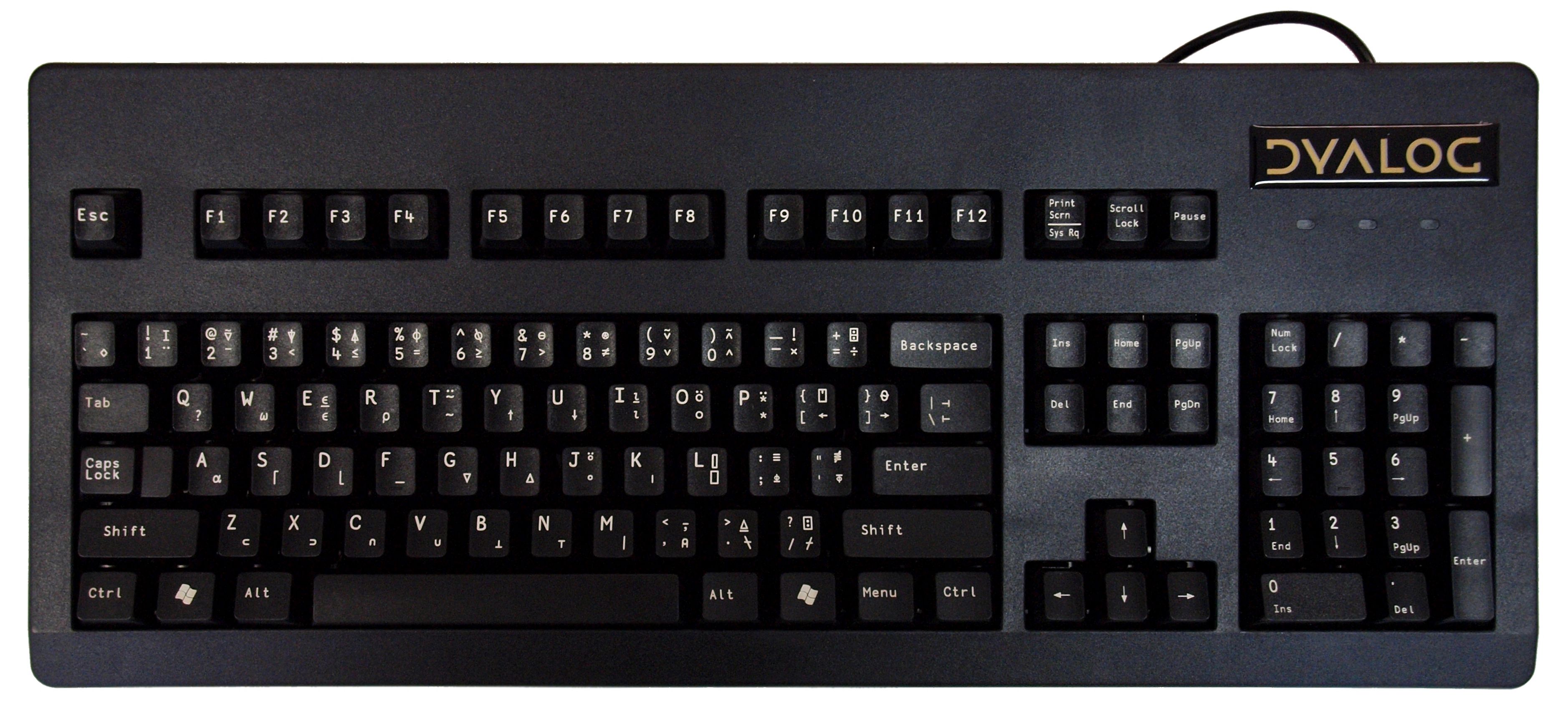
Having said that, I have a layer on my keyboard dedicated to APL symbols. I highly recommend QMK keyboards for shennanigans like these
You can get an APL keycap set for your existing Unicomp keyboard, or do a custom order for any of their models. They will even print you custom keycap sets: https://www.pckeyboard.com/page/category/Buttons
The trackball Unicomp is IMO the best keyboard being manufactured (right now they are out of stock until Q3 2021): https://www.pckeyboard.com/page/category/ClassicTrackball
Buckling spring is just a superior (although less durable) key switch technology than the Honeywell switches used in Symbolics keyboards (and most other keyboard switch mechanisms as well). One thing that the Symbolics keyboards did right is having both the APL and Greek legends on keycaps.
But none of this matters if you do not have the right software. GNU Emacs greek and TeX input-methods, and the C-x 8 iso-transl keymap (which you can extend) makes writing mathematical symbols really easy.
Hopefully the various administrations will start to push it to replace old keyboards...
There's also a BÉPO version, which would have been even better, but I guess that would be too much inertia to fight?
Also why ç was moved to C, since it's much less common.
And now since you can do both of these methods, you can finally write upper case properly in French on Windows !
While it works very nicely, it's of course unavailable outside Sublime, so I've been looking for alternatives and came across the following projects:
https://github.com/ibus/ibus (example: https://github.com/sphaerophoria/ibus-memebox) https://github.com/fdw/rofimoji/
Hopefully at some point I'll find the time to adapt them to my purposes.
New link is here: https://www.microsoft.com/en-us/download/details.aspx?id=102... Remember to turn on windows features for old .NET before you install MSKLC
And I assume that less common characters have been put there ?
But I assume that you're talking about {}, which some programmers use quite frequently, and which are still locked behind AltGr, though in a better position than before?
(Also, there's always Alt+Ctrl, though it's certainly not ideal either...)
Personally I like being able to type math symbols on occasion but don't do so often enough to benefit from a custom keyboard layout that I'd then have to memorize. I didn't have a good way to do this until about a year ago, when I learned about Espanso [1] which is a cross-platform text expander. I installed it and set it up to substitute various (vaguely LaTeX-inspired) macros to UTF-8 strings. For example, typing the following keystrokes
x = R cos(:phi) sin(:lambda :minus :lambda:nought)
I chose ':' as a prefix for all my macros but this is just a self-enforced convention; you can configure a substitution for any sequence of keystrokes. Since I gave all the characters names that made sense to me, I don't have to think much when I type them.
A few of the substitutions I get the most mileage out of:
- The Greek alphabet, both upper and lowercase (:theta → θ and :Omega → Ω)
- Double-struck letters for numerical sets; e.g. :RR → ℝ
- :infinity → ∞
- :neq → ≠
- :pm → ±
Of course you HAVE already turned on your Windows 10 clipboard history, RIGHT? ;) https://www.howtogeek.com/671222/how-to-enable-and-use-clipb...
A properly rendered minus is identical to the horizontal stroke of a plus (whereas hyphen is frequently shorter and/or incorrectly vertically aligned).
Can you confirm?
https://www.ldlc.com/fiche/PB00279741.html
Also I think that Cherry made some ?
But of course, until the State will start enforcing the norm, it will remain an amateur-only thing.

#/media/File:APL-keybd2.svg)