The WWW before it had escaped from CERN, and you weren't on a NeXT system, looked terribly primitive when you already had networked hypermedia like NeWS, particularly when you didn't understand the significance of the WWW protocol and addressing.
https://medium.com/@donhopkins/hyperlook-nee-hypernews-nee-g...
>SimCity, Cellular Automata, and Happy Tool for HyperLook (nee HyperNeWS (nee GoodNeWS))
>HyperLook was like HyperCard for NeWS, with PostScript graphics and scripting plus networking. Here are three unique and wacky examples that plug together to show what HyperNeWS was all about, and where we could go in the future!
[...]
>The Axis of Eval: Code, Graphics, and Data
>We will return to these three important dimensions of Code, Graphics and Data as a recurring theme throughout this article. But which way to go from here?
>Alan Kay on NeWS:
>“I thought NeWS was ‘the right way to go’ (except it missed the live system underneath). It was also very early in commercial personal computing to be able to do a UI using Postscript, so it was impressive that the implementation worked at all.” -Alan Kay
It was indeed deeply inspired by and indebted to HyperCard, but of course had networking built in thanks to NeWS, and used PostScript as the data format and networking protocol (like XML and JSON are now used), and as the scripting language (which is more like Lisp than HyperTalk), and as the imaging model instead of pixels (including a nice built-in structured graphics editor component that supported EPS and raster images too, which you could use to build your own apps, property sheets, and editors, like the editable Clock component the article shows).
Another significant difference between HyperCard and HyperLook is that HyperLook used its own "stacks" to implement its own user interface for property sheets, etc. HyperCard just used the traditional Mac Toolbox for its user interface, instead of property sheets and dialogs being stacks. So you could edit and customize HyperLook property sheets and dialogs, and define new classes of HyperLook widgets, and then build your own seamlessly integrated property sheets for them (or just customize the property sheets of existing components). For example, I defined some NeWS Toolkit OPEN LOOK components like sliders and buttons and menus to support SimCity, all configurable with their own property sheets. The property sheets could use as many PostScript graphics editor components as they needed: for example, the editable clock component's property sheet let you edit its clock face, minute hand, and hour hand, which it rotated and drew around the clock. ...But it was just too slow to practically redraw a second hand once per second, so I left that out! Then you could copy and paste your custom clocks into any HyperLook stack, in case you cared what time it was.
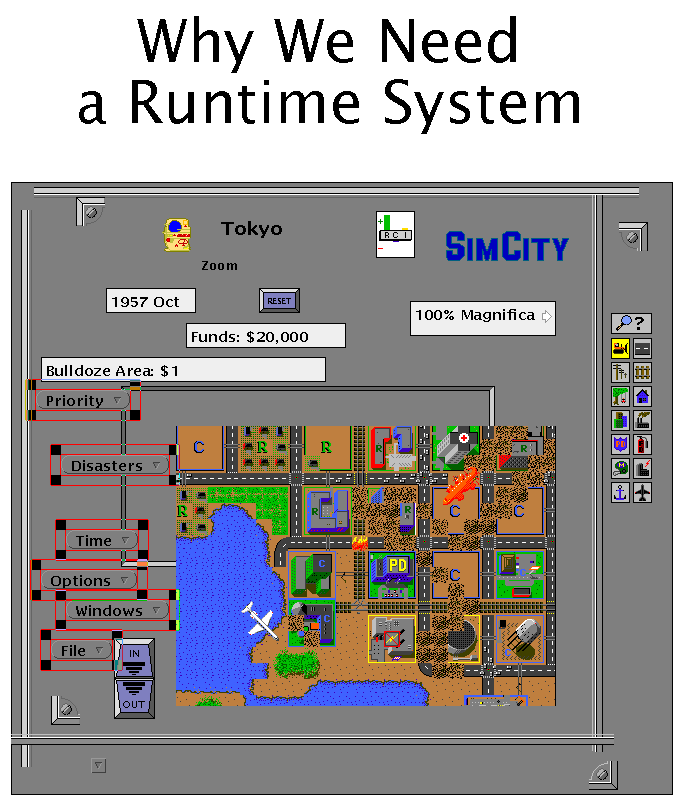
However, this feature did enable "user interface vandalism", so HyperLook has a non-editable runtime system with the editors stripped out, that you could ship with apps:
http://www.art.net/~hopkins/Don/hyperlook/TalkRunTime.gif
In case you don't like PostScript as much as I do, Arthur van Hoff also wrote "PdB", an object oriented C to PostScript compiler that you could use to write classes and scripts. Later, after working on Java at Sun and leaving to found Marimba, Arthur wrote Bongo in Java, which was inspired by HyperCard (and called the Java compiler he wrote at Sun to dynamically compile scripts), and Danny Goodman wrote the book on Bongo! (He also wrote the book on HyperCard.) Arthur's working at Apple, now.
https://en.wikipedia.org/wiki/Arthur_van_Hoff
https://www.amazon.com/Official-Marimba-Guide-Bongo-Goodman/...
https://books.google.nl/books?id=NToEAAAAMBAJ&pg=PA47&lpg=PA...
I've included links to a bunch of brochures, articles, product info, documentation, and SimCity README and manual at the end of the article. Here's the link to the HyperLook product info, which summarizes it pretty well, and the HyperLook SimCity manual, which has a lot of screen snapshots and shows what it can do.
HyperLook Product Info:
http://donhopkins.com/home/HyperLook-Product-Info.pdf
HyperLook SimCity Manual:
https://donhopkins.com/home/HyperLook-SimCity-Manual.pdf
Also here's an illustrated transcript of a HyperLook SimCity demo (that shows all kinds of other HyperLook and NeWS stuff too, and includes a link to the original video):
https://medium.com/@donhopkins/hyperlook-simcity-demo-transc...
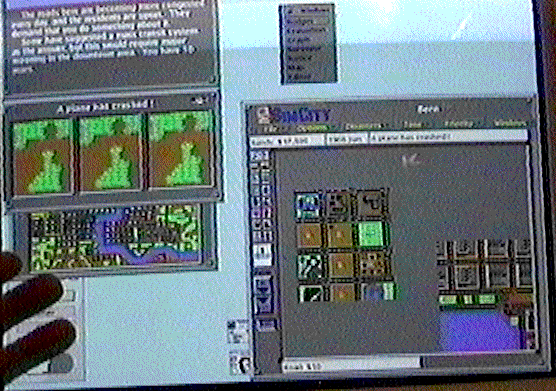
Imagine a window manager built on top of something like HyperLook, where users can not only edit the "chrome" in the window frames to make them look and behave any way they prefer, but also compose custom task-oriented interfaces by copying and pasting components from different parts of the same app, or even different apps, and integrating them by scripting, so you don't have to flip between different windows and navigate to different parts of multiple apps, and you just have all the controls you need together in one place, without any unnecessary junk. For example, SimCity came with an audio mixing server that other apps could use by sending messages to it, which would be mixed with SimCity's sounds, so you could make a button that went "PING" whenever you pressed it, then copy and paste it into any other HyperLook stack, and it would work! Or you could make a custom "SimCity Surveillance" window by copying three different map views into the same window:
https://miro.medium.com/max/556/0*XknyNX0FMotAR7y_.gif
>The neat thing is that this view here itself is just another user interface component, and I can copy and paste that, and have multiple views. Each one of these animated scrolling SimCity editors, once I’ve made one, I can put them anywhere. This window, you can click here to get three of them.